
On Etsy, your first photo does most of the selling. Shoppers scroll fast and tap the listing whose first image looks clear, bright, and true to the piece. A dark, blurry, or cluttered first photo often never gets a second look, no matter how good the description is.
The good news: you do not need a studio. A phone camera, a window, and a clean background are enough for a solid original photo. This guide shows how to shoot that original, piece by piece, and how AI tools can fix the usual weak spots — retouching, a clean background, a model try-on image, and a consistent set.
Before You Shoot: Light, Background, and Cleaning
Use soft, indirect light. Place the piece near a bright window, out of direct sun. Direct sun creates hard reflections; a cloudy day or a sheer curtain softens it. With a lamp, use one light source, not mixed warm and cool bulbs, so metal color stays honest.
Keep the background simple. Etsy does not require a white background, so use a light, plain surface: white paper, pale linen, or a light stone tile. What matters is contrast and consistency across your shop. Avoid patterned cloth and busy props.
Clean the piece and the surface. Fingerprints, dust, and mounting putty show up far more in a close-up than in real life. Wipe the piece with a soft cloth and check for lint first. A minute of cleaning saves a reshoot.
Set the phone up properly. Use the rear camera and tap the screen to focus on the piece. Hold the phone steady — a small tripod, a stack of books, or elbows on the table all help. Shoot at your phone's highest resolution, aiming for a shorter side of at least 2,000 pixels, so the photo stays sharp on zoom.
Shooting by Piece: Placement and Scale
Different pieces fail in different ways.
Earrings
Photograph earrings as a pair, side by side, at the same angle and spacing. Mismatched angles make the set look uneven. Shoot studs straight on so the stone or design fills the frame. For drops and hoops, use a slight angle, plus one shot of the pair hanging.
Necklaces
Lay a necklace flat in its natural curve, or hang it on a plain bust or stand, with the full length visible in at least one photo. Avoid the most common mistake: a tangled chain or a pendant cut off at the frame's edge. Leave space around the clasp and pendant, plus a pendant close-up.
Rings
Rings are small, so they need a scale reference. Photograph the ring upright on a plain surface or stand, straight on and from a slight angle, with one scale photo — on a finger, next to a coin, or beside a familiar object. Without a reference, shoppers cannot tell a delicate band from a bold statement ring.
Bracelets
Lay a bracelet in a loose circle or gentle curve, not stretched straight. Photograph the clasp and any charm or stone detail in close-up, since buyers inspect those most.
For every category, take one straight, well-lit hero shot first, then the detail and scale shots.
Common Original-Photo Problems and AI Fixes
Even a careful shoot leaves weak spots. This table pairs each problem with its fix, so you only reshoot when you have to.
| Original-photo problem | What to do |
|---|---|
| Dust, fingerprints, or putty still visible | Run it through the AI jewelry photo retoucher to clean marks and sharpen metal and stone detail without changing the piece. |
| Dull color or flat light | Retouch the same photo for color and clarity, comparing it with the original at full size. |
| Messy or distracting background | Use the retouching tool's white-background option for a clean main image. |
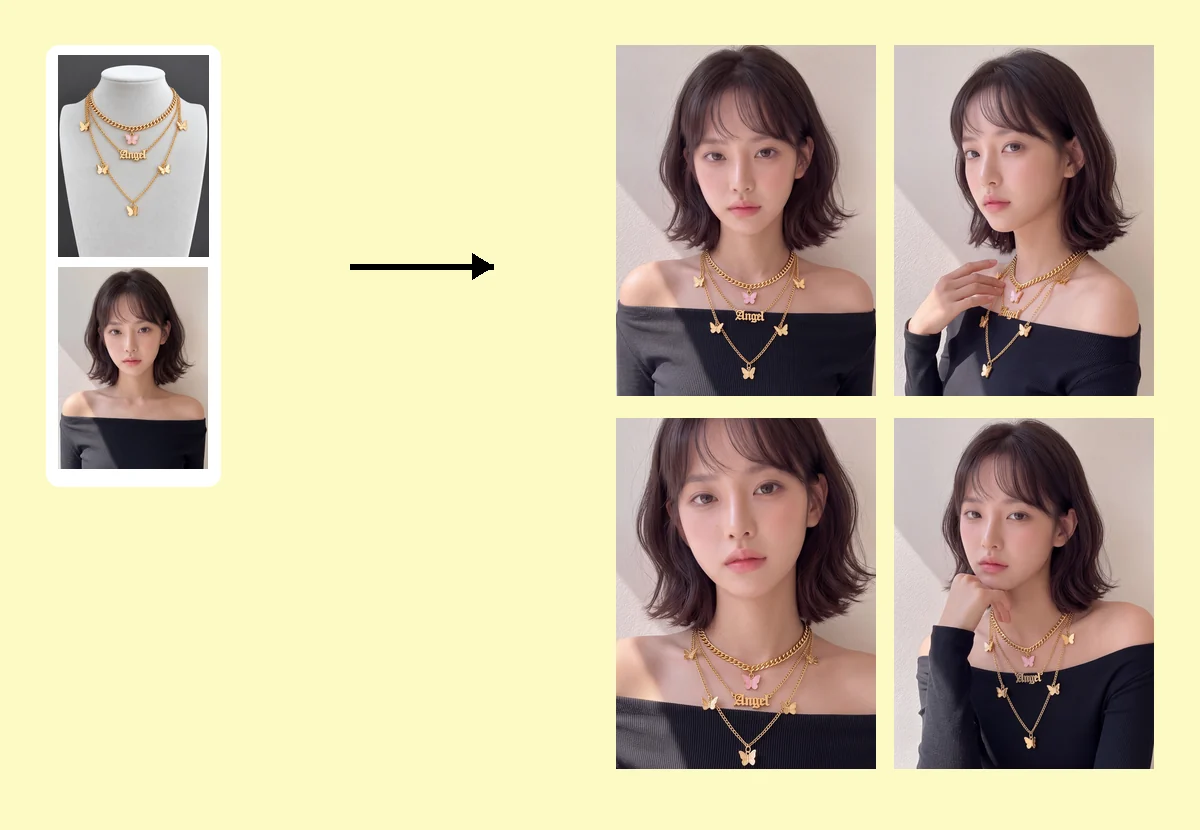
| No model or lifestyle photo | Generate a model wearing shot with the AI jewelry try-on tool from your clean product photo. |
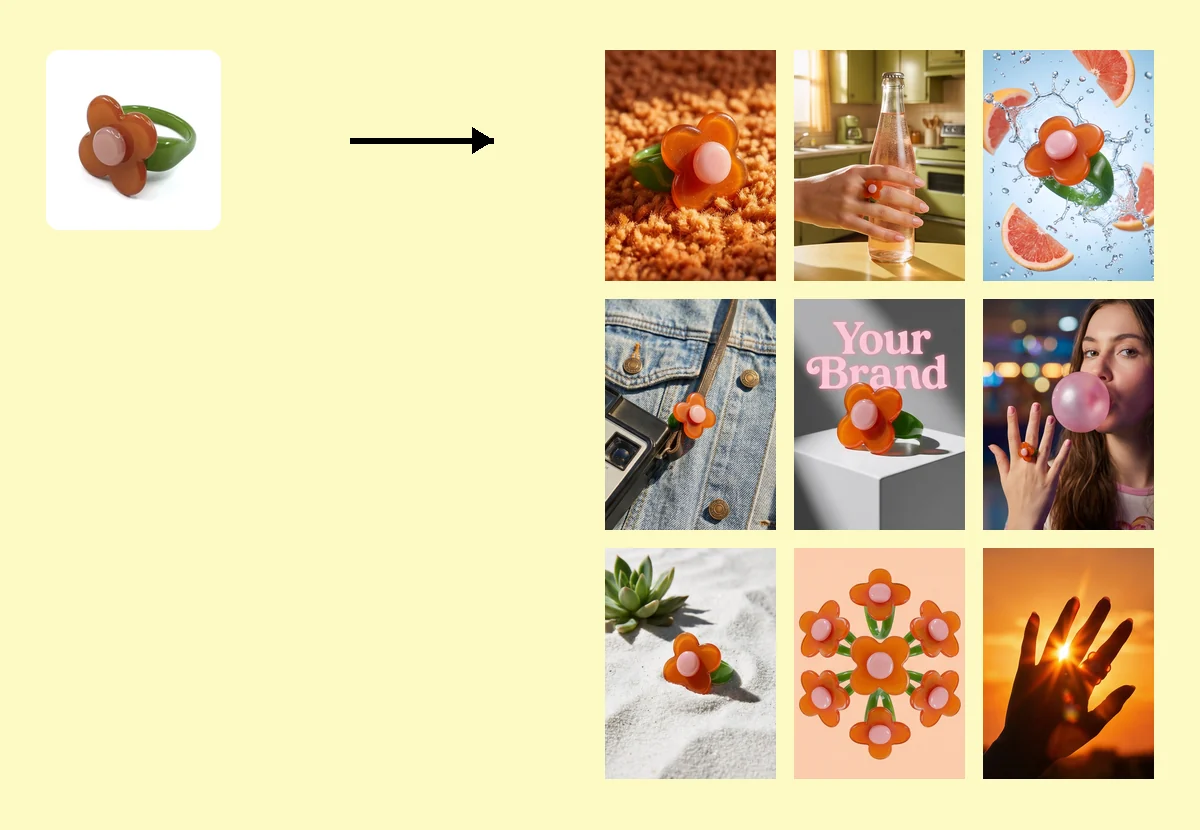
| Photos inconsistent across listings | Use the AI jewelry set generator to produce a matched set from a single product photo, with one background and one style. |
The rule is simple: AI fixes a good original; it does not rescue a bad one. A blurred, badly lit, or partly hidden piece still needs a reshoot.
A Complete Listing Image Set for Etsy
Etsy allows up to ten images per listing, but you do not need ten. A complete set answers: what is it, how big is it, what does the detail look like, and how does it look worn? Here is a seven-image set:
- Hero shot: the piece straight on, bright, on a plain background — the image shoppers see in search.
- Full piece: the whole item in frame, showing its full length or shape.
- Detail close-up: the stone, engraving, clasp, or setting, sharp enough to inspect.
- Scale shot: the piece on a hand or finger, or next to a familiar object.
- Model or lifestyle shot: the piece worn, generated with the AI jewelry set generator or the try-on tool.
- Back or side angle: the clasp, back, or profile.
- Styled scene (optional): the piece in a simple setting matching your shop's look.
Keep the same background style and brightness across the set. Consistency is what makes a shop look professional. Note the difference from the AI product image set tutorial: that tutorial generates a set with AI, while this set is a shooting plan for your own original photos.
Frequently Asked Questions
Do Etsy photos need a white background?
No. Etsy has no mandatory white-background rule, unlike Amazon's main-image requirement. A plain, light background works well, and a consistent styled background can suit a handmade shop. What Etsy rewards is clarity: the piece in focus, well lit, and easy to see at thumbnail size.
How large should my Etsy photos be?
Aim for a shorter side of at least 2,000 pixels. That keeps the photo sharp when shoppers zoom in on stones, engravings, and clasps. Always upload your highest-resolution original, not a screenshot or compressed chat copy.
Can I photograph jewelry with just a phone?
Yes, for most Etsy listings. A modern phone's rear camera, soft window light, and a plain background are enough. A tripod helps sharpness and a lightbox helps consistency, but neither is required to start. Spend your effort on light, cleaning, and focus first.
What if my photos are good but my listings still get few clicks?
Check the first image first: test a brighter, tighter hero shot with the piece larger in the frame. Then check the set: one photo, no scale reference, and no worn shot leaves too many questions unanswered. Add the missing angles above before rewriting the title or description.
Summary
Photographing jewelry for Etsy is mostly preparation: soft light, a plain background, a clean piece, and a steady phone. Shoot each category with its own placement and scale reference — pairs for earrings, full length for necklaces, scale for rings, shape and clasp for bracelets — then fix the remaining weak spots with AI retouching, a clean background, a try-on image, and a consistent set.
Try the AI jewelry photo retoucher on your best original photo, and build your listing set around the result.