
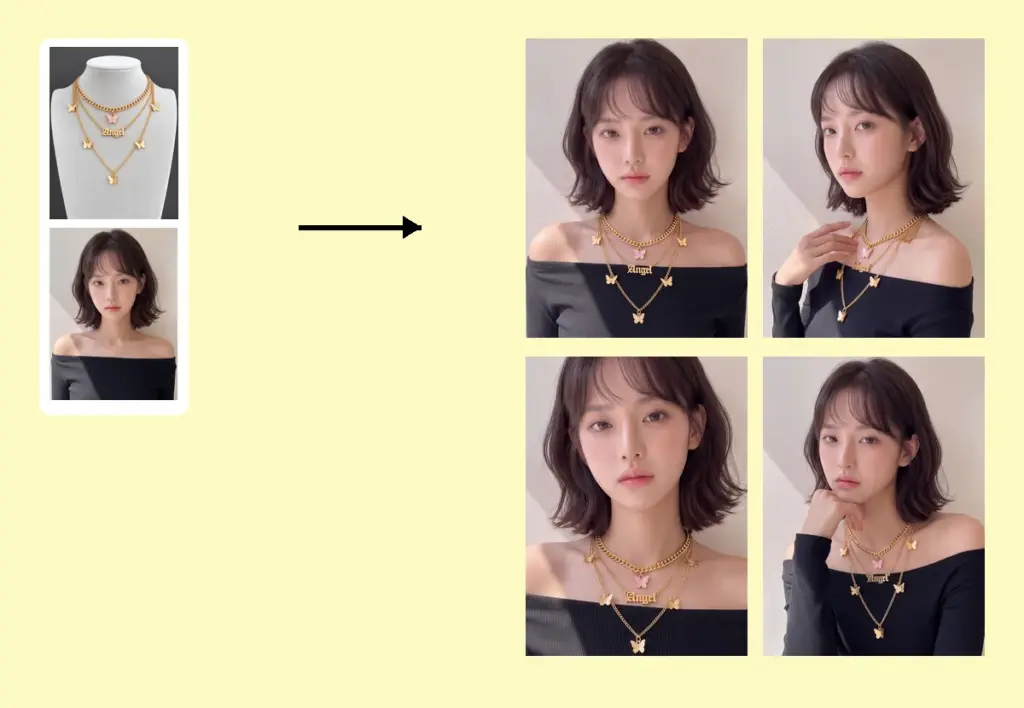
AI Jewelry Try-On lets you naturally add earrings, necklaces, rings, and other jewelry to model photos, generating 4 realistic try-on images with different poses in one go for ecommerce and marketing use.
Upload one image for each item. Multiple images will be processed in batch mode. Maximum 6 images.
Drag and drop or click to upload
Upload 1 model image.
Drag and drop or click to upload
Generate 4 images at once. If the jewelry has many fine details, turn this option off to generate only 1 image per request.
Generating...
Booking a model, a studio and a photographer for every new collection is slow and expensive. TheMiniTech's AI virtual jewelry try-on tool puts your earrings, necklaces, rings and bracelets onto a real-looking model in minutes. Upload a product photo and a model photo, and the AI places the jewelry at a natural scale, with matching light and shadows, and gives you 4 on-model images in different poses from a single run.
It's built for Shopify, Etsy and Amazon sellers, jewelry brands and marketers who need jewelry model photography for listings, ads and social posts, without organizing a photoshoot.
Need more detail? Read the step-by-step AI jewelry try-on tutorial.
Starting from a photo that still has dust, putty marks or a messy background? Clean it first with the AI jewelry photo editor — a clean white-background product photo gives the try-on tool the most accurate result.
It's a way to make photos of jewelry being worn without a physical photoshoot. The AI takes your product image and a model image, then combines them into a realistic on-model photo.
Yes. This virtual jewellery try-on runs in your browser — no app or plugin to install — and works for earrings, necklaces, rings and bracelets. Upload a product photo, add or generate a model, and download on-model images sized for your listings, ads and social posts.
Yes. New accounts get 150 free credits. One try-on run uses about 50 credits, so you can test the tool before choosing a plan. See pricing for more credits.
Earrings, necklaces, rings, bracelets and other wearable jewelry. Glasses and eyewear have their own AI glasses try-on tool.
Yes. The images are made for ecommerce and marketing, including product listings, ads, social media and your own store. Check each marketplace's image rules, for example a white background for an Amazon main image.
No. You can upload one if you have a specific model in mind; if you don't, the AI generates a model for the try-on, and you can describe the person you want in the prompt. You can also create a reusable model first with the AI model generator.
With Image Set on, each run gives you 4 try-on images in different poses. Turn it off to get 1 more detailed image per run.