
AI Jewelry Try-On V2 is designed for creating realistic on-model jewelry images, with improved support for mini earrings, studs, ear cuffs, and multiple accessories worn together. In this AI Jewelry Try-On Tutorial, you’ll learn how to prepare jewelry images, use multiple accessory inputs correctly, and create more natural try-on results with better scale, placement, and proportions.
This tutorial explains the key rule of the v2 workflow: uploading multiple jewelry images does not activate batch mode. Instead, the tool treats those images as multiple jewelry items that should be worn together in one final try-on result.
How Does AI Jewelry Try-On V2 Work?
In Jewelry AI Try-On Tool v2, you can upload more than one jewelry image. However, this is not the same as batch generation. The system will not treat each uploaded jewelry image as a separate task. Instead, it will try to place multiple jewelry items on the model in the same image.
For example, if you upload several small earring images, the AI will understand them as accessories that should appear together on the person. This makes the v2 tool helpful when you want to create a coordinated jewelry look, a multi-piece accessory set, or a realistic try-on image that shows more than one item.
If your goal is to generate separate results for different jewelry products, upload and generate them one by one. If your goal is to show multiple accessories worn together, upload the related jewelry images in the same task.
Examples
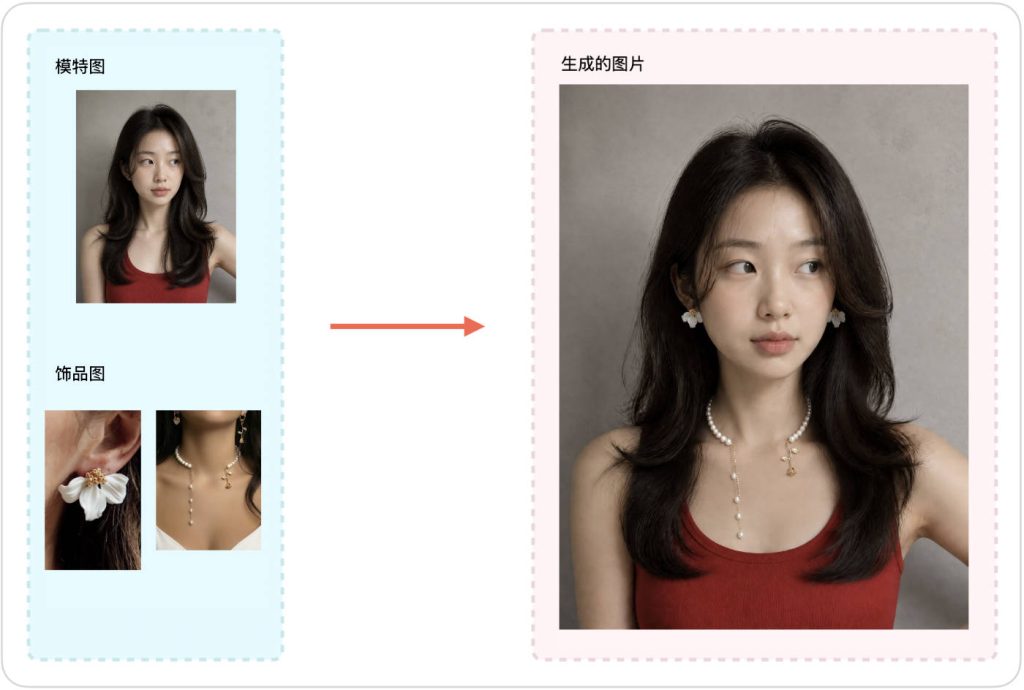
Why AI Jewelry Try-On V2 Works Better for Mini Earrings
One important advantage of the v2 jewelry AI try-on tool is that it can create better results for very small earrings and delicate ear accessories. Mini earrings are difficult for AI tools because they are small, precise, and easy to lose during generation. Earlier try-on workflows may enlarge the earring too much, blur the shape, or place it in an unnatural position.
The v2 workflow is better suited for subtle jewelry placement. It can help create more natural wearing effects for small studs, tiny hoops, minimal earrings, ear cuffs, and delicate decorative pieces. This is useful for e-commerce sellers who need realistic product visuals for small jewelry styles.
What do I need to prepare before using it?
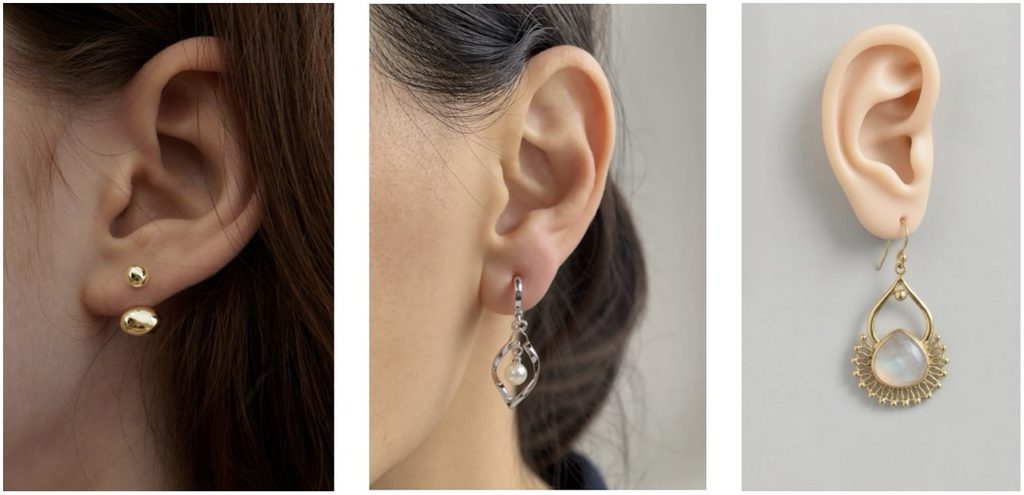
- Person image: It is recommended to use a photo with clear visuals, natural lighting, and no obstructions in the wearing area. For earring effects, the person's ears should be clearly visible.
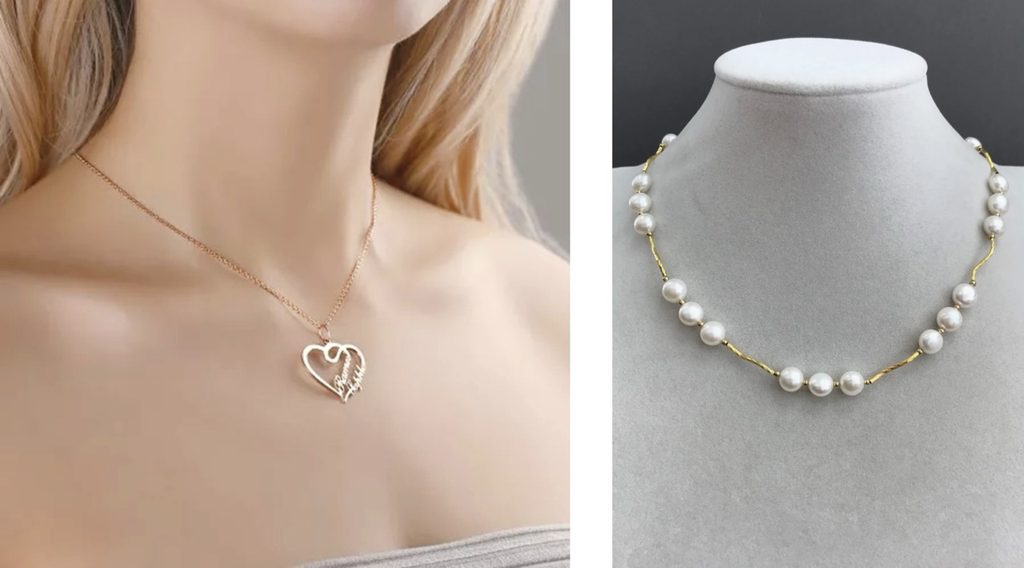
- Product image: For earrings and necklaces, it is best to use a wearing image whenever possible, as this helps capture the correct scale between the product and the human body. If no model is available, a mannequin can be used as a substitute.
Jewelry Try-On V2 – Steps for Use
Step 1: Upload a person image
Upload the photo of the person to whom you want to add jewelry. Images that are clear, evenly lit, and show the wearing area clearly will help the tool better determine the placement, size, and angle of the jewelry.
Step 2: Upload one or more product images
Upload the product images of the jewelry you wish to try on. You may upload just one image, or multiple product images at the same time.
Note: Uploading multiple product images does not activate batch mode. V2 will attempt to place all of these jewelry items on the same person in a single result, rather than generating separate results for each product image individually.
Step 3: Generate and review the result
Submit the images and begin generation. After completion, carefully check the placement, size and proportion, edge blending, and detail naturalness of the jewelry. If the result is not satisfactory, try using clearer source images, or reduce the number of jewelry items uploaded at the same time before retrying.
Best Use Cases for Jewelry AI Try-On Tool v2
- Generating realistic try-on images for mini earrings and small ear jewelry.
- Showing multiple jewelry items worn together in one coordinated look.
- Creating e-commerce product visuals for earrings, ear cuffs, studs, and subtle accessories.
- Testing how different jewelry pieces look on a real person before creating final product images.
- Producing social media visuals, product page drafts, and advertising image concepts.
Tips for Better AI Jewelry Try-On Results
- Use clear jewelry images with a clean background whenever possible.
- For mini earrings, make sure the earring shape is visible and not too blurry.
- Upload multiple jewelry images only when you want them to appear together in one try-on image.
- If you want separate try-on results for different products, generate them in separate tasks.
- Review the wearing position carefully, especially for earrings, ear cuffs, and small accessories.
How to Keep the Correct Jewelry Size and Proportions
For mini earrings and other delicate jewelry, product scale is especially important. When possible, use a reference image that provides a clear size reference, such as an ear, neck, finger, or wrist. This helps the AI better understand the expected jewelry dimensions and placement.
For very small earrings, studs, and ear cuffs, a clear close-up reference generally produces more reliable proportions than an isolated white-background jewelry image.
Conclusion
Jewelry AI Try-On Tool v2 is best understood as a tool for realistic jewelry wearing effects, not as a batch generator. When you upload multiple jewelry images, the AI tries to place those items together in the same result. This makes it useful for coordinated jewelry looks and multi-accessory try-on images.
The biggest improvement of v2 is its support for smaller, more delicate earrings. If you need AI-generated try-on images for mini earrings, ear cuffs, subtle studs, or small jewelry pieces, this version can provide more natural placement and better visual control.
FAQ
What is AI Jewelry Try-On V2?
AI Jewelry Try-On V2 creates realistic jewelry-wearing images from product and model photos, with improved support for mini earrings, delicate ear jewelry, and multiple accessories worn together.
Is AI Jewelry Try-On V2 better for small earrings?
Yes. V2 is optimized for smaller and more delicate jewelry such as studs, tiny hoops, ear cuffs, and subtle earrings, where accurate placement and proportions are especially important.
Can I try on multiple jewelry pieces at the same time?
Yes. When multiple jewelry images are uploaded in V2, the AI treats them as accessories that should be worn together in the same image rather than as separate batch-generation tasks.
Does uploading multiple jewelry images create batch results?
No. Multiple jewelry images are combined into one try-on result. If you want separate results for different products, generate each jewelry item in a separate task.
How can I keep earrings at the correct size?
Use clear product images and, when possible, provide a wearing reference that shows an ear or another recognizable size reference. This helps the AI better understand the expected size, position, and proportions of the jewelry.
What types of jewelry work with AI Jewelry Try-On V2?
V2 works especially well for earrings, studs, tiny hoops, ear cuffs, and other delicate accessories, and it can also be used to create coordinated looks with multiple jewelry pieces.
Try it here: Jewelry AI Try-On Tool v2.