
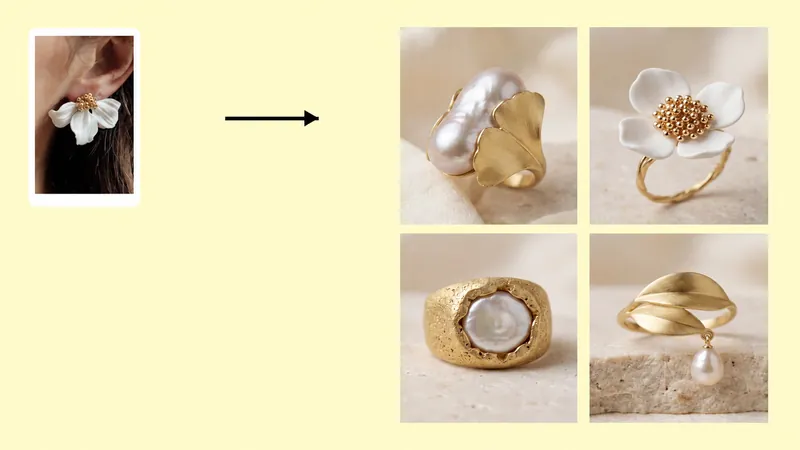
Create jewelry design concepts with AI using a required main reference, optional style images, a prompt, and your chosen image ratio. Generate four concept images per run.
Drag and drop or click to upload
Drag and drop or click to upload
Drag and drop or click to upload
Enter the preferred color tone or other requirements.
Generating...
Explore new jewelry concepts with an AI jewelry design tool built around reference images. Upload a main image of the jewelry or design direction you want to develop, then add optional references and a short prompt to guide the visual result. The tool supports concepts for rings, earrings, necklaces, bracelets, and other jewelry categories.
Use the generated images to compare early creative directions, discuss ideas with a team or client, or plan future product visuals. They are concept images, not production-ready CAD files or 3D models. A jewelry designer or CAD specialist should review a selected direction before manufacturing.
Use an earring reference to explore variations in silhouette, color, or decorative direction. Add a supporting image when a specific material or detail should influence the concept.
Start with a necklace or pendant reference and describe the style you want to explore. A second image can provide a visual cue for a chain, focal element, or finish.
Upload a clear ring reference and use the prompt to guide broad design choices such as a minimal, vintage, or gemstone-focused look. Review the generated image as an idea, not a precise product specification.
Use a bracelet or coordinated jewelry reference to explore a related design direction. Keep the main reference focused, and add optional images only when they contribute a useful visual cue.
An AI jewelry design workflow helps you explore several visual directions from a main reference without sketching every variation first. Designers and sellers can use the images to support early brainstorming, compare broad style choices, prepare visual discussions, and decide which ideas need professional refinement. The output is a starting point for creative review, not a substitute for technical design work.
AI can generate visual jewelry concepts from reference images and a prompt. These images can help with ideation and discussion, but they are not manufacturing-ready CAD or 3D files.
Upload a required main reference to Image 1, optionally add supporting images in Image 2 or Image 3, enter a prompt if needed, choose an image ratio, and generate. A normal run returns four images.
Open the AI Jewelry Design tool, add a clear reference, describe the direction you want, and generate concept images in your browser. Use the results to compare ideas, then have a qualified designer prepare any technical files needed for production.
For a step-by-step explanation of reference images and batch mode, see the AI Jewelry Design tutorial.