
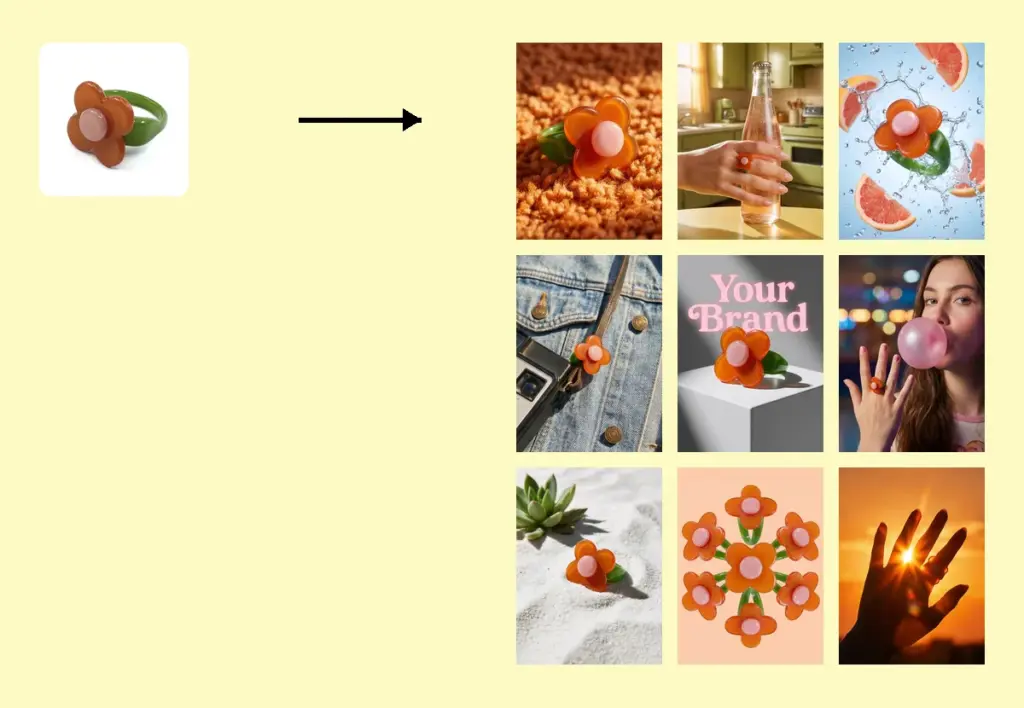
Upload product images and generate 9 e-commerce product images in the same style with no text in one go.
Drag and drop or click to upload
This can be another product angle, a model or pet to wear the product, or any other useful reference.
Drag and drop or click to upload
Drag and drop or click to upload
Enter the product name, selling points, preferred color tone, or other requirements.
Generating...
Creating a complete product gallery usually means planning multiple photos, backgrounds and compositions. TheMiniTech's AI Product Image Set tool turns one clear product photo into nine coordinated ecommerce images with a consistent visual style and no embedded text. It is especially useful for AI jewelry product photography, where sellers need several clean views for product pages, ads and social media without rebuilding every scene manually.
The tool is not limited to jewelry. It can also create image sets for beauty products, fashion accessories, home goods, electronics, pet products, packaging and other physical items. Optional reference images help the AI understand angles, materials, included accessories or how a product is worn or used.
This tool is suitable for various product categories, not just jewelry.
Create coordinated visuals for studs, hoops and drop earrings. Add a close detail image or an optional model reference when shape, scale or wearing position matters.
Build product and lifestyle images for pendants, chains and layered pieces. Reference photos can clarify the clasp, pendant detail, packaging or on-model presentation.
Generate a consistent set for engagement rings, bands and statement rings. Clear close-ups help preserve stone shape, setting structure and metal color.
Show bracelets, bangles and multi-piece sets across complementary scenes. Use reference images to explain every included piece and avoid confusing similar components.
Upload one clear jewelry product image, add optional detail or model references, choose the ratio and size, and generate the set. The tool returns nine coordinated images that you can review and adapt for ecommerce use.
Use AI to expand a strong source photo into additional product and lifestyle visuals. It works best as a way to create more presentation options while preserving your original product photo as the factual reference.
Describe the product name, preferred mood, background direction, color palette and intended use. Keep instructions focused on presentation rather than changing stones, metal, proportions or included pieces.
Yes. You can use it for cosmetics, bags, shoes, small electronics, home accessories, pet products, packaged goods and other physical products. Start with a clear main image and use references to explain details that are not visible from the primary angle.